How to Install Podman 3.4.2 on Debian 11 via openSUSE Repository
Overview
In environments running Debian 11, the official package repositories often do not include Podman version 3.4.2. If you are operating on a Debian 11 server or virtual machine and require this specific version for compatibility or feature requirements, this guide will walk you through installing it using the third-party openSUSE libcontainers repository. It also covers binding the GPG key properly to prevent NO_PUBKEY errors.
What You'll Need
- Hardware
- 1 × EG series gateway (e.g., EG5101 or EG51xx)
- Software
- Debian 11 operating system
- RobustOS Pro
- Prerequisites
- Root or sudo privileges on the device
- It is recommended to back up any existing container configurations before making changes to the container engine to avoid unexpected data loss or service disruption.
Step-by-Step Configuration Guide
Phase 1: System Preparation and Cleanup
- Install Base Tools: Update your software sources and install the necessary dependencies for adding new repositories.
      sudo apt update
      sudo apt install -y curl gpg ca-certificates
- Clear Old Repository Configurations: If you have attempted to configure this repository before, remove the old configuration files and keys to prevent conflicts.
      sudo rm -f /etc/apt/sources.list.d/devel:kubic:libcontainers:stable.list
      sudo rm -f /usr/share/keyrings/devel_kubic_libcontainers_stable.gpg
Phase 2: Add the Third-Party Repository
- Import the Repository GPG Key: Download and save the repository signature key securely.
      curl -fsSL https://download.opensuse.org/repositories/devel:/kubic:/libcontainers:/stable/Debian_11/Release.key \
        | gpg --dearmor \
        | sudo tee /usr/share/keyrings/devel_kubic_libcontainers_stable.gpg > /dev/null
Note: You can verify the key was generated successfully by running ls -l /usr/share/keyrings/devel_kubic_libcontainers_stable.gpg.
4. Add the Podman Repository: Write the repository into your APT configuration, explicitly specifying the key imported in the previous step using the signed-by method.
      echo "deb [signed-by=/usr/share/keyrings/devel_kubic_libcontainers_stable.gpg] https://download.opensuse.org/repositories/devel:/kubic:/libcontainers:/stable/Debian_11/ /" \
      | sudo tee /etc/apt/sources.list.d/devel:kubic:libcontainers:stable.list
Phase 3: Install Podman
- Update APT Index: Refresh your package lists to include the new repository.
sudo apt update
(If there are no GPG errors, the repository is configured correctly.)
6. Check Available Podman Versions: Verify that version 3.4.2 is now available in your APT policies.
apt policy podman
- Install the Specific Version: Install Podman 3.4.2 from the repository.
sudo apt install -y podman=100:3.4.2*
Phase 4: Configure Rootless Mode (Recommended)
If you plan to run containers as a non-root user (rootless mode), you need to configure specific dependencies. For more background on rootless containers, refer to the Podman Rootless Tutorial.
- Install Rootless Dependencies:
sudo apt install -y uidmap slirp4netns fuse-overlayfs
- Configure SubUIDs and SubGIDs: Check if your current user has mapped IDs.
      cat /etc/subuid
      cat /etc/subgid
If your username is missing from the output, add it by executing:
      echo "$USER:100000:65536" | sudo tee -a /etc/subuid
      echo "$USER:100000:65536" | sudo tee -a /etc/subgid
Verification & Testing
To confirm your configuration is successful, check the installed version and system information.
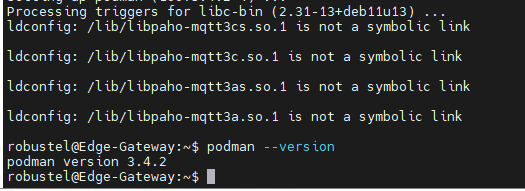
- Run the version command:
podman --version
- Expected Result: The system should successfully output your installed version.
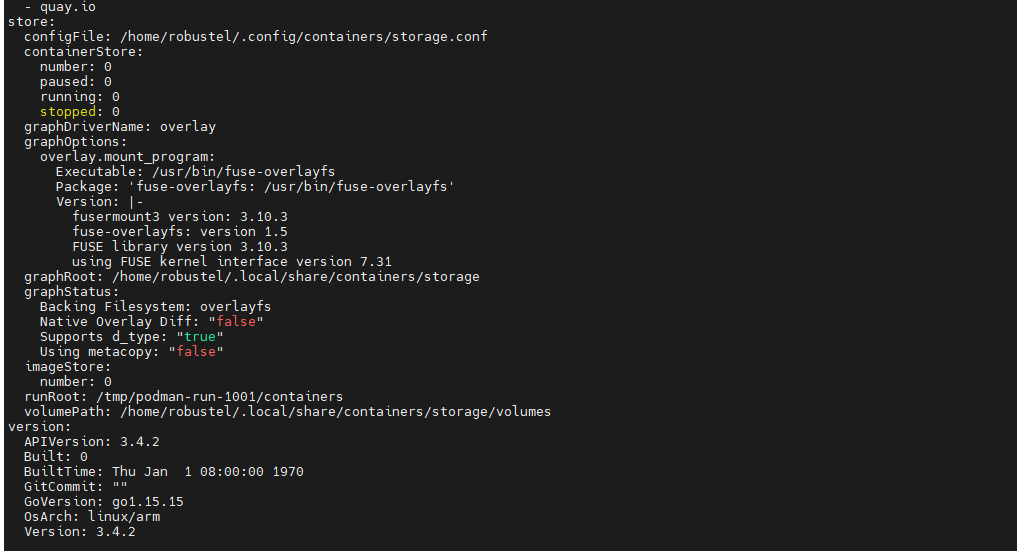
- To ensure the container engine is functioning properly, view the detailed runtime state:
podman info
Troubleshooting / FAQ
Q1: I am receiving a NO_PUBKEY error when running apt update. How do I fix this?
A: This usually means the system is using an older, unauthenticated list file. Repeat Step 2 to delete the .list and .gpg files, then carefully rerun Step 3 and Step 4 to ensure the signed-by attribute correctly points to the newly downloaded GPG key.
Q2: Is there an automated, one-click script to do all of this?
A: Yes. If you prefer to run the setup automatically, you can copy and paste the following bash script:
sudo apt update
sudo apt install -y curl gpg ca-certificates

sudo rm -f /etc/apt/sources.list.d/devel:kubic:libcontainers:stable.list
sudo rm -f /usr/share/keyrings/devel_kubic_libcontainers_stable.gpg

curl -fsSL https://download.opensuse.org/repositories/devel:/kubic:/libcontainers:/stable/Debian_11/Release.key \
  | gpg --dearmor \
  | sudo tee /usr/share/keyrings/devel_kubic_libcontainers_stable.gpg > /dev/null

echo "deb [signed-by=/usr/share/keyrings/devel_kubic_libcontainers_stable.gpg] https://download.opensuse.org/repositories/devel:/kubic:/libcontainers:/stable/Debian_11/ /" \
| sudo tee /etc/apt/sources.list.d/devel:kubic:libcontainers:stable.list

sudo apt update
sudo apt install -y podman=3.4.2*
podman --version
Q3: How do I completely uninstall this specific Podman version and remove the repository?
A: If you no longer need Podman or this repository, run the following commands sequentially:
# Uninstall Podman
sudo apt remove -y podman

# Remove third-party repository and keys
sudo rm -f /etc/apt/sources.list.d/devel:kubic:libcontainers:stable.list
sudo rm -f /usr/share/keyrings/devel_kubic_libcontainers_stable.gpg

# Update APT lists
sudo apt update
Conclusion
By following these steps on your Robustel edge computing gateway, you have bypassed the default Debian 11 limitations and successfully deployed Podman 3.4.2. Utilizing the signed-by repository method ensures your package management remains secure and free of GPG warnings moving forward.
Revision History
| Version | Date | Author | Changes |
|---|---|---|---|
| 1.0 | 2026-06-12 | Hubery | Initial document creation. |