How to Streamline IoT Gateway Deployment with Robustel Zero-Touch Provisioning (ZTP)
Summary
Manually provisioning thousands of IoT devices is slow, expensive, and error-prone. This guide introduces Robustel Zero-Touch Provisioning (ZTP), a powerful solution that uses automation and centralized management to solve these challenges. Learn how Robustel ZTP can significantly reduce deployment time and costs while enhancing scalability for your large-scale IoT projects.
Introduction
Robustel's Zero-Touch Provisioning is a powerful feature designed to dramatically simplify and accelerate the deployment of Robustel devices at scale. It addresses the common challenges of manually configuring large numbers of IoT devices, which can be time-consuming, costly, and prone to errors.
The system works by allowing administrators to pre-configure device settings, firmware, and applications within the Robustel Cloud Manager Service (RCMS) using "Device Templates". When a new Robustel device is powered on in the field and connects to the internet for the first time, it automatically communicates with RCMS. The platform then identifies the device and pushes the pre-defined configuration profile to it, enabling the device to become fully operational without requiring manual intervention by a skilled technician on-site.
Prerequisites / What You'll Need
Before you begin, ensure you have these components ready.
● Robustel Gateway: At least one gateway running RobustOS or RobustOS PRO.
● RCMS Account: An active account for the Robustel Cloud Manager Service (RCMS), which is the central command center for this process.
● Internet Connection: Your gateway needs an active internet connection to reach RCMS. Offline provisioning is not supported.
● Configuration Templates: A pre-configured template in RCMS that defines your desired device settings. 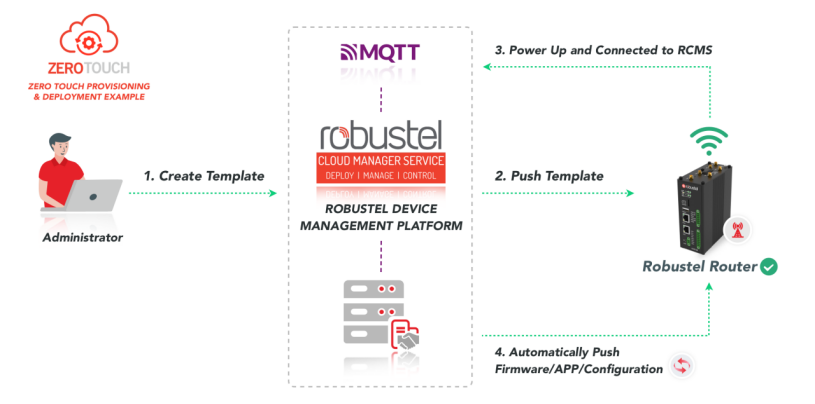
Step-by-Step Guideto Robustel Zero-Touch Provisioning
This guide breaks down the Robustel ZTP process into four simple steps.
Step 1 Prepare Your Configuration Template
The initial and foundational step involves defining the desired configuration for your IoT gateways within the RCMS platform.
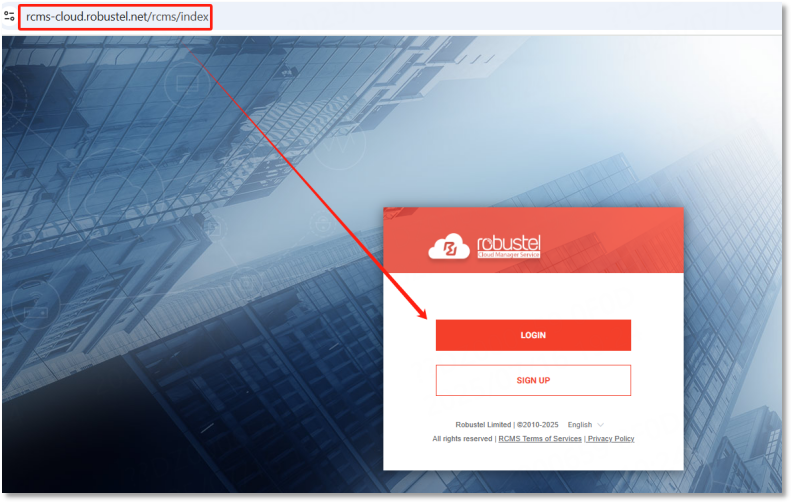
●Access RCMS: Begin by logging into your Robustel Cloud Manager Service (RCMS) account. This is your central hub for all device management activities.
●Navigate to Templates & Choose OS Template: Once logged in, navigate to the "Templates" section within the RCMS interface. This area is dedicated to creating and managing your device configurations. Then select an appropriate OS Template. These templates serve as blueprints for your device configurations, allowing you to standardize settings across multiple devices.
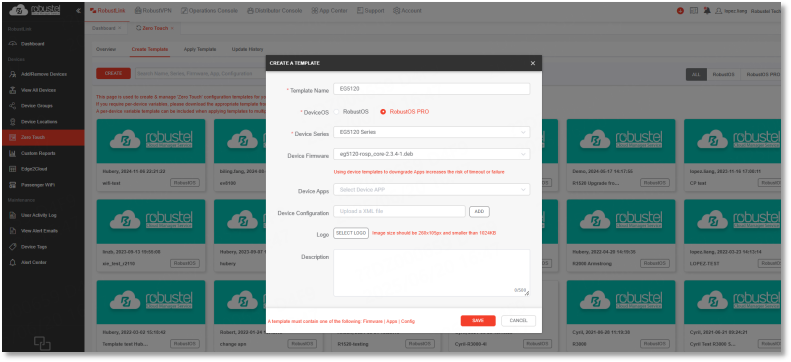
●Add Device Variables: A crucial feature of Robustel ZTP is the ability to incorporate "device variables." This allows you to define parameters that will be unique to each individual device (e.g., specific IP addresses, sensor IDs, or unique identifiers) while still using a common template. This capability ensures that while the core configuration remains consistent across your fleet, specific parameters can be customized for each gateway, providing both flexibility and uniformity.
●Save Template: Once you have defined all the necessary settings and variables, save your template within RCMS. This template will then be ready for deployment to your devices.
Step 2 Connect Your Devices to RCMS
For your Robustel gateways to be provisioned, they must first establish a connection to the RCMS platform. This step represents the initial handshake, where the physical gateway establishes basic network connectivity to reach the cloud-based RCMS.
●Initial Network Connectivity: Ensure your Robustel gateway has basic network connectivity (e.g., via Ethernet, Wi-Fi, or cellular) to access the internet.
●RCMS Connection: The gateway will then attempt to connect to the RCMS platform. For detailed instructions on how to connect your specific Robustel device model to RCMS, you can refer to the quick start guide provided with your device or available on the Robustel support portal. This initial connection is vital as ZTP cannot occur offline; an active internet connection to RCMS is a prerequisite for device provisioning.
Step 3 Apply the Provisioning Template
Once your devices are connected to RCMS and your configuration templates are prepared, the next step is to apply the desired provisioning template to your target gateways. This is where the "zero-touch" aspect truly manifests, as the configuration is pushed remotely without any manual intervention at the device level.
●Select Target Devices & Apply Pre-configured Template: Within the RCMS dashboard, identify and select the specific Robustel gateways to which you wish to apply the configuration. You can select individual devices or groups of devices for mass deployment. Then choose the pre-configured template you prepared in Step 1 and initiate the application process. RCMS will then automatically push these settings to the selected devices.
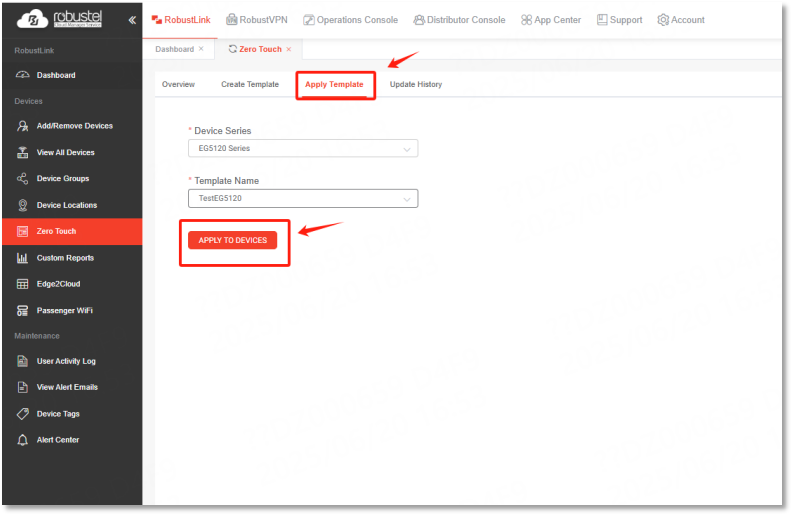
●Device Reboot: Upon receiving the new configuration, the devices will typically perform a reboot to apply the changes. After rebooting, they will emerge with their new, desired configuration, fully provisioned and ready for operation according to your specifications.
Step 4 Monitor and Confirm Provisioning
The final and crucial step involves monitoring the provisioning status and confirming the successful deployment of your configurations. This ensures that all devices are configured correctly and efficiently.
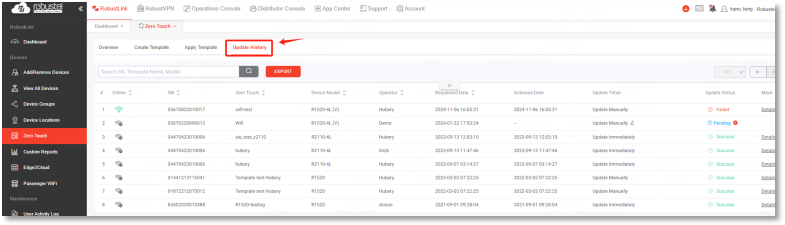
●Check Status in RCMS Dashboard: Users can check the provisioning status directly within the RCMS dashboard. Navigate to the "Update History" section, which provides a real-time tracking interface for provisioning progress.
●Verify Configuration: Confirm that the new configuration has been successfully applied and that the device is functioning as expected according to the template. This might involve checking device logs, connectivity status, or specific application parameters within RCMS.
●Troubleshooting Options: Should any issues arise during the provisioning process, the RCMS interface provides options to retry the provisioning process for specific devices or to export relevant data for further analysis and troubleshooting. This monitoring capability is crucial for auditability and effective management in large-scale deployments.
Verification & Testing
After successfully applying your configuration template through Robustel ZTP, it is essential to verify and test that your IoT gateways are operating as intended with the new settings. This step ensures the integrity and functionality of your deployment.
●RCMS Dashboard Monitoring: The primary method for verification is through the RCMS dashboard. After the devices have rebooted and applied the new configuration, observe their status indicators within RCMS. Look for green lights or "online" statuses, indicating successful connection and operation.
●Check Update History: Review the "Update History" section in RCMS for each provisioned device. This log will confirm that the template was successfully pushed and applied, often showing a "completed" or "success" status.
●Configuration Audit: For critical deployments, you may want to perform a configuration audit within RCMS to ensure that all specific parameters defined in your template (e.g., network settings, VPN configurations, application settings) have been correctly adopted by the device.
●Functional Testing (if applicable): Depending on your specific IoT application, you might perform a simple functional test. For example, if the gateway is collecting sensor data, verify that data is being transmitted correctly to your cloud platform. If it's part of a remote control system, attempt a basic command to confirm responsiveness. This hands-on verification provides an additional layer of assurance beyond just status indicators.
FAQ
To provide further clarity and address common inquiries, the following frequently asked questions offer concise answers regarding Robustel's ZTP solution, helping you quickly resolve potential issues.
●Q1: What devices support Robustel ZTP?
A: All Robustel gateways running RobustOS or RobustOS PRO with an active RCMS connection.
●Q2: Can I provision devices offline?
A:No. Robustel ZTP is a cloud-based process and requires an active internet connection.
●Q3: Are unique configurations supported?
A: Yes, Robustel ZTP is highly flexible and supports unique configurations for individual devices. This is achieved through the intelligent use of "per-device variable templates" within RCMS. This feature allows you to define a standardized base configuration while simultaneously customizing specific parameters for each unique gateway, providing granular control within a scalable framework.
Conclusion
After completing this guide, users should understand how Robustel Zero Touch Provisioning works with RCMS templates to automate gateway setup. New devices should be able to connect to RCMS and receive predefined configuration profiles when the process is prepared correctly. Users should verify device status and applied settings in RCMS before relying on the workflow for larger rollouts.